
Introduction
If after power surge electronics behave strangely, you’re not alone. Many homeowners experience this situation: the power flickers or comes back after an outage, devices turn on again — but something feels off. Maybe your TV randomly restarts, your computer runs slower, chargers behave inconsistently, or appliances make unfamiliar sounds.
This can be unsettling because nothing is completely broken, yet everything feels slightly unstable. The good news is that this is a common scenario after voltage spikes. A power surge doesn’t always destroy electronics immediately — sometimes it causes partial stress or subtle internal issues.
Possible reasons include:
- partial internal component damage
- firmware glitches or corrupted settings
- weakened power supplies
- stress on internal circuits.
Understanding what happened — and how to safely check your devices — helps you decide whether the problem is temporary or something that needs attention.
What a power surge actually does to electronics (simple explanation)
A power surge is a sudden increase in voltage beyond what your devices are designed to handle. This spike may last only milliseconds, but it can still affect sensitive electronics.
Inside most devices are small components designed for stable electrical input. When voltage suddenly jumps:
- internal circuits receive more energy than expected
- protective components try to absorb the excess
- delicate parts may overheat briefly.
Sometimes damage is immediate and obvious — the device stops working entirely. But often, the effect is more subtle.
Why some devices don’t fail instantly
Modern electronics include safeguards such as:
- internal voltage regulators
- surge suppression circuits
- fuses or protective resistors.
These protections may prevent total failure but still allow partial damage. For example:
- components weaken rather than fail completely
- firmware becomes unstable
- power supplies lose efficiency.
This explains why electronics acting weird after power surge is a common outcome.
Common strange behaviors after a power surge
When internal components are stressed but not destroyed, devices may show inconsistent behavior.
Watch for these symptoms:
- Random restarts or shutdowns
- Flickering displays or dim screens
- Unusual buzzing or humming sounds
- Slower performance or lag
- Charging problems with phones or laptops
- Wi-Fi routers dropping connection more often
- Devices needing multiple attempts to power on.
Sometimes issues appear days or weeks later, especially if weakened parts gradually deteriorate.
Is it safe to keep using electronics after a surge?
In many cases, yes — but it depends on the symptoms.
Minor glitches
These may include:
- settings reset
- temporary lag
- software errors.
Often these can be resolved through resets or updates.
Potentially unsafe warning signs
Stop using the device immediately if you notice:
- burning smell or melted plastic
- excessive heat
- sparks or smoke
- loud buzzing or crackling
- repeated shutdowns without warning.
These signs suggest internal electrical problems that could worsen with continued use.
Step-by-step troubleshooting checklist
If your device unstable after surge, follow this calm and methodical process.
1. Fully power cycle devices
- Turn the device off.
- Unplug it from power.
- Wait at least 1–2 minutes.
- Plug back in and restart.
This allows internal capacitors to discharge and resets some temporary faults.
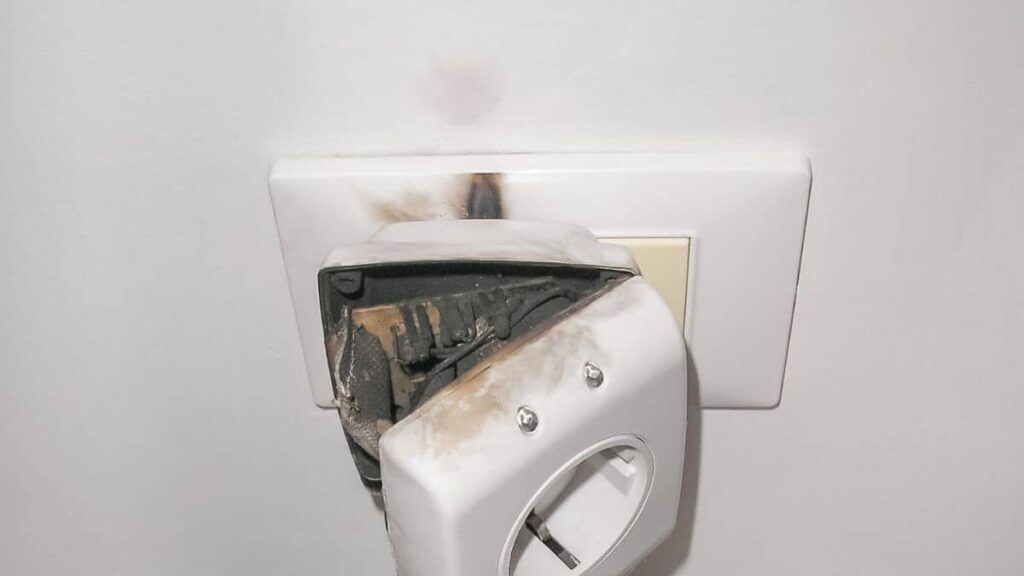
2. Check outlets
A surge can affect not only devices but also power strips or outlets.
Look for:
- discoloration
- loose plugs
- unusual warmth.
If unsure, try another outlet.
3. Inspect power strips and surge protectors
Surge protectors sometimes sacrifice themselves during a spike.
Check:
- indicator lights
- burnt smell
- visible damage.
If the surge protector no longer shows protection status, replace it.
4. Test with a different power source
Plug the device into:
- a different wall outlet
- a known-working surge protector.
This helps rule out outlet-related issues.
5. Reset settings if needed
Some electronics may benefit from:
- factory reset (after backing up data)
- firmware updates
- reconnecting network settings.
6. Monitor behavior over time
Observe for:
- worsening instability
- new symptoms
- increased heat or noise.
Stable performance over several days is a good sign.
Hidden damage that shows up later
One tricky aspect of surge damage is delayed failure.
Capacitor weakening
Capacitors regulate power flow inside devices. A surge may partially damage them, leading to:
- unstable power delivery
- random shutdowns later.
Power supply instability
Internal power supplies may become less efficient, causing:
- flickering
- charging inconsistencies
- startup issues.
Gradual component failure
Small electronic components sometimes degrade slowly after stress, meaning problems may appear weeks later.
This is why voltage spike damage signs shouldn’t be ignored even if devices still work.
When you should stop using the device immediately
Safety always comes first.
Stop using and unplug immediately if you notice:
- overheating or very hot surfaces
- electrical smell
- smoke or visible sparks
- loud electrical buzzing
- display flickering combined with power instability.
These signs suggest potential internal electrical hazards.
How to protect electronics from future surges
Preventive steps can save frustration — and money.
Use quality surge protectors
Look for models with:
- high joule rating
- indicator lights showing protection status.
Consider whole-house surge protection
Installed at the electrical panel, this helps reduce large surges entering the home.
Unplug during severe storms
Lightning-related surges can bypass some protection devices.
Use UPS (Uninterruptible Power Supply)
For computers or sensitive electronics, a UPS provides:
- battery backup
- voltage stabilization
- additional protection.
FAQ
Can a power surge damage electronics without breaking them?
Yes. Surges can weaken components without causing immediate failure, leading to instability or unusual behavior later.
Why do devices act weird after a surge?
Voltage spikes stress internal components and may disrupt firmware or power regulation systems, causing unpredictable performance.
Should I replace electronics after a power surge?
Not always. Many devices continue working normally after troubleshooting. Replacement is usually needed only if instability worsens or safety signs appear.
How do I know if internal damage occurred?
Watch for recurring resets, overheating, strange noises, or inconsistent power behavior — these are common surge damage symptoms.
after power surge electronics behave strangely — what should I do first?
Start by unplugging and fully power cycling devices, checking outlets and surge protectors, and testing with a different power source.
Conclusion
If after power surge electronics behave strangely, it doesn’t automatically mean everything is permanently damaged. Often, devices experience temporary instability or partial stress rather than complete failure.
The key is to approach troubleshooting calmly: power cycle devices, check power sources, monitor behavior, and watch for safety warning signs. Strange behavior is frequently a sign of partial electrical stress, not immediate danger — but it’s still worth paying attention to.
With careful observation and proper surge protection going forward, most households can restore stability and reduce the risk of future problems.